
Blog / Best Tax Resources for Students: How to File and Maximize Your Refund (2026 Guide)
Sundance Blog
Best Tax Resources for Students: How to File and Maximize Your Refund (2026 Guide)

Accounting, Tax, and Payroll Diploma
Employment Opportunities:
- Accounting Assistant/Technician
- Bookkeeper
- Income Tax Return Preparer
- Payroll Administrator
Accounting, Tax, and Payroll Learn more
Student aid eligible
6 April 2026 | Author: Vallankan Mendonca
| Read Time:
Quick Answer
The best tax-filing resources for students include H&R Block, CloudTax, UFile, TurboTax, and free tax clinics offered by the Canada Revenue Agency. These options are NETFILE-certified and work well for most student tax returns.
Before filing, have your SIN ready along with your T2202 from your college portal and any T4 or T4A slips. Filing still matters even with no income. You may qualify for the GST/HST credit and can carry forward unused tuition amounts to reduce taxes in future years.
The deadline to file your 2025 return is April 30, 2026.

Table of Contents
As a student, you’re busy with school, homework, and maybe even a job. With everything going on, it’s easy to put off thinking about taxes. But handling your taxes doesn’t have to be overwhelming. There are free and low-cost ways to get help, and filing your taxes could give you some extra money back. You might even get credits or savings that help you out now and in the future.
We’ll walk you through trusted tax filing resources, what documents you need, and how to claim student tax benefits effectively this tax season.
Best Free & Low-Cost Tax Filing Resources for Students
Approach your taxes like an important assignment deadline – start early and you’ll find it’s surprisingly simple and affordable to complete by April 30th. Below are five low-cost and free tax filing resources you can use to help simplify the preparation and filing process:
H&R Block – Best for In-Person & Online Help
Starting with the most familiar to us all: H&R Block. With offices in nearly every town and city, it’s a name many Canadians recognize.
Beyond their in-person services, H&R Block offers a user-friendly online platform with a free basic return option that’s perfect for students and those with uncomplicated returns. If at any point you feel stuck, you have the option to purchase their Expert Help feature where you’ll get personalized support.
Cloud Tax – Most Accessible
Cloud Tax is all about making tax filing simple. The video tutorials and educational resources provided help first-time student filers make sense of their taxes. Plus, the unlimited email support from tax experts and step-by-step guidance from customer services offers more peace of mind every step of the way.
With its user-friendly software, you can import your slips directly from the CRA or use CloudTax’s AI-powered scanning tools to save time and reduce errors. And with their mobile app, you can file on the go—right from your phone, whenever it fits into your schedule.
Best of all, their Pay-What-You-Want model means you can file for free or contribute what you can, making it a budget-friendly option.
UFile – Best for Students with Families
UFile allows you to file tax returns for yourself and multiple family members together.
UFile boasts that any student, regardless of income, can file totally free of charge. It also, like others, allows you to auto-fill your return from your tax slips.
As long as you’re a Canadian post-secondary student with eligible tuition fees and are listed as the “Family Head,” you can file online with UFile for free. You can also file for your family in one place, saving time during tax season.
TurboTax – Best for Maximizing Deductions
TurboTax is a popular option for students filing a simple tax return. The free version covers basic tax needs, with paid options available for more complex situations.
Depending on the version, you can prepare more than one return, although limits may apply.
TurboTax also helps identify credits and deductions you may be eligible for. It works on phones, laptops, and tablets, so you can file in a way that suits you.
If your return includes scholarships or freelance income, you may need to upgrade for full support.
CRA’s Free Tax Clinics – Get Help from Volunteers
Through the Community Volunteer Income Tax Program (CVITP), community organizations across Canada host free tax clinics during the 2026 tax season. Trained volunteers can complete and file your taxes at no cost, either in person, by phone, through videoconference, or using a drop-off service.

What Documents Do Students Need to File Their Taxes?
Before you sit down to file your taxes, you need to gather important tax information. As a student, these are the necessary documents you’ll need to get your tax returns filed:
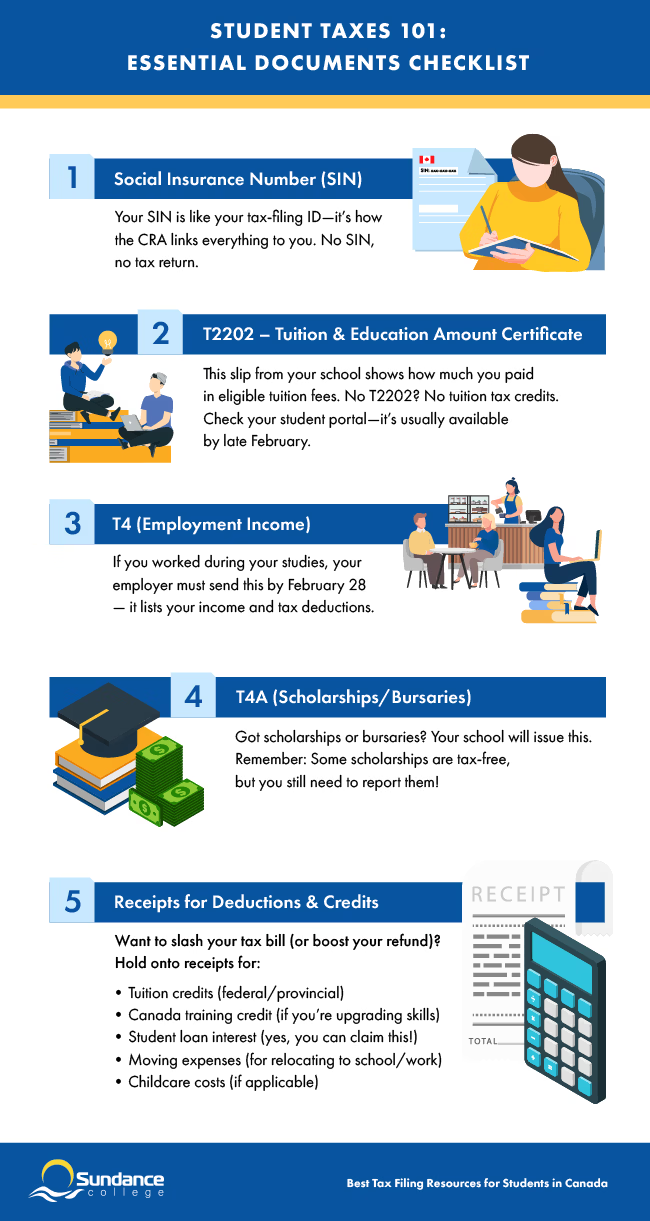
Social Insurance Number (SIN)
Your SIN is your personal identification number for all interactions with the federal government, including the Canada Revenue Agency (CRA). It’s required to file your return and link your tax documents to your profile.
T2202 – Tuition & Education Amount Certificate
This form shows the tuition fees you paid during the tax year. You can find your T2202 in your student portal, usually available in February.
At Sundance College, T2202 tax forms are delivered through SmartVault, a secure online document portal. Students receive an email notification to their personal email address with instructions to access and download their documents. All tax forms are issued on or before February 28, with most distributed a few days in advance to ensure timely access.
T4 & T4A – Employment Income & Scholarships
Your T4 highlights your employment income and deductions. If you worked during school, you should receive your T4 from your employer. Meanwhile, if you’ve received a scholarship or bursary in the tax year, you should receive your T4A from your educational institution. You should have these slips no later than the last day of February.
Receipts for Eligible Deductions
Once you’ve gathered all your documents, don’t file your taxes just yet. You’ll want to collect any receipts that qualify for deductions, such as:
- Federal & provincial tuition tax credit
- Canada Training Credit
- GST/HST Training Credit
- Student loan interest deduction
- Moving expenses
- Childcare
These documents help you reduce your tax owed and maximize your refund.
Student Tax Credits: What to Claim
For students, college tuition and other eligible expenses will reduce your total tax payable and could result in a refund. Remember, you will need additional documentation to be awarded credits. Below are some of the most common credits and deductions available to students:
Tuition Tax Credit (Federal & Provincial Credits)
The federal tuition tax credit is one of the top tax credits for post-secondary students. Even if you aren’t reporting any income this year, you can use this credit to claim the eligible tuition fees you paid to take your program.
You can also carry unused tuition credits forward or transfer them to relatives that qualify, such as:
- Parents
- Grandparents
- Spouses
- Common-law partners
Once you’ve checked your tuition tax credit eligibility, don’t forget to also check out other tax credits and benefits for individuals.
Canada Training Credit (For Students 26+)
The Canada Training Credit (CTC) is a refundable tax credit to help cover the cost of eligible training fees. To claim the CTC, you must meet all six of these conditions:
- You filed your income tax return for the year
- Your Canada Training Credit Limit (CTCL) is more than $0
- You lived in Canada all year
- You paid tuition or exam fees for courses or tests you took that year
- Your school or course is eligible, meeting the following criteria:
- It’s a school in Canada that offers post-secondary education, or
- It’s a Canadian school certified to provide job-related training.
- The tuition must qualify for the regular tuition tax credit.
- You were between 26 and 65 years old at the end of the year
If you qualify, the CRA adds $250 to your limit each year (up to a lifetime max of $5,000), as long as you file your taxes—even in years when you use the credit. When you file your taxes, fill out Schedule 11 in your paper tax package or just follow the steps in your tax software.
GST/HST Credit (Even If You Have No Income)
Another refundable tax credit to claim is the GST/HST Credit. This tax credit is meant to help individuals and families with low and modest incomes to help offset the federal sales tax that they pay.
You may qualify for the GST/HST credit if:
- You live in Canada for tax purposes at the end of the month before and the start of the month when the CRA sends the payment.
- You are 19 years or older before the payment month. If you’re under 19, you can still qualify if you either have a spouse, common-law partner, or you’re a parent and live with your child.
To get the GST/HST Credit, make sure you file your tax return, even if you didn’t earn any income.
Student Loan Interest Deduction
Did you take out student loans to pay for your post-secondary education? All those payments towards it could be to your benefit this tax season. If you received your student loan under certain circumstances, you may be able to claim interest on them.
Moving Expenses
Be sure to keep documentation of your purchase price for any transportation or moving-related expenses. Why? If you moved for educational purposes, you may be able to claim certain expenses as deductions on this year’s tax return.
You can claim moving expenses if the following apply to you:
- You moved at least 40 km closer (using the shortest usual travel route) to your school or new job.
- You set up your new home as your main place to live (for example, you sold or rented out your old home).
- Your move was within Canada.
As a student, keep in mind you can only claim your moving costs against the taxable part of your scholarships, bursaries, research grants, fellowships, or certain prizes.
Tip: Keep all your records and documents in case the CRA asks for them!
Childcare Expenses
Are you a student and a parent? If so, you or your spouse might be able to claim some of the money you spent on childcare in order to attend school. Here are some of the types of care that usually count:
- Babysitters or nannies
- Daycares and nursery schools
- School or educational program fees that go toward childcare
- Day camps or sports camps (not including intense training or competitive programs)
- Overnight camps or boarding schools
If you’re not sure whether something counts, the CRA’s Child Care Expense Deduction guide has more info.
Choosing the Right Tax Software – What to Consider
Here are some things to keep in mind when choosing the right free, online tax software for your filing needs:
Netfile Certification – Confirm CRA Compliance
Netfile is a service provided by the Canada Revenue Agency (CRA) which allows you to file your taxes from your computer or electronic device. Before choosing tax software, make sure it is Netfile approved. All of the above-mentioned companies are Netfile-certified.
Free vs. Paid Versions – Which One Do You Need?
When choosing between free and paid tax software, it all comes down to your filing needs—whether you’re submitting a simple return or navigating a more complex one. Here are a few key features to consider when weighing your options:
Ease of Use & Guidance
Look for software with a clear, user-friendly interface, step-by-step instructions, and built-in error checks. Paid versions can provide more in-depth guidance and explanations, but it is possible to find free versions that include them.
Features & Functionality
Essential features like:
- CRA Auto-fill My Return to help automatically pull tax slips like T4s, RRSPs, and tuition forms.
- Carry forward information for previous tax years.
- Access to all necessary tax forms (especially for self-employed or complex returns).
Keep in mind some tax forms are limited to the free versions but widely available in paid options.
Support & Help Options
Free software usually limits support to FAQs or help articles, while paid plans can include live chat, phone support, or access to tax professionals. Some even offer audit assistance for peace of mind.
Multi-Return & Multi-Device Access
Need to file for a family member or switch between devices? Choose software that supports multiple returns under one account and syncs your progress across desktop and mobile.
Pricing & Transparency
Free versions are appealing but may come with upsells or hidden fees. Paid versions tend to be more upfront about what’s included, helping you avoid surprises.
The right option depends on which product provides the features you require at the best price.
“Maximum Refund Guarantee” – What It Means
While comparing tax software options, you’ll likely see many of them advertising a “maximum refund guarantee”. A maximum refund guarantee promises to calculate the largest refund (or reduce your tax bill as much as possible) allowed by law.
However, the specifics of these guarantees differ – which matters because it could affect your ability to claim.
When filing your taxes with one of the above service providers, make sure to read the small print on their websites, and check if:
- The guarantee still applies if you forget to upload some information
- The free version of the software allows for this guarantee
- There is a deadline to submit a refund claim
By knowing the details of a maximum refund guarantee, you can avoid hidden costs and make a more informed decision about what tax software to choose.
Step-by-Step: How to File Taxes as a Student
Filing taxes as a student in Canada involves gathering your documents and receipts, using certified tax software, and submitting your return before the deadline. Follow these steps to complete your return:
- Step 1. Get your Social Insurance Number (SIN)
- Step 2. Gather your T2202, T4, and T4A slips
- Step 3. Choose a free NETFILE-certified tax software
- Step 4. Use the CRA’s Auto-fill My Return to import your tax information
Step 5. File your return online before April 30, 2026
How Sundance College Can Help You!
Whether you’re a current student or planning a return to education in the near future, the right tools and information can make the whole tax-filing process simpler.
For more help visit the CRA website or to speak to someone at CRA call their information line at 1-800-959-8281.
If all this talk about credits and deductions, details and numbers have you wondering if tax preparation is the career for you, learn more about the different tax careers you can start with an Accounting, Tax, and Payroll diploma.
Fill out this form to connect with an admissions advisor for more information.
Student Tax Filing FAQs
Tax season can bring up a lot of questions—especially if you’re a student filing for the first time. Here are some quick answers to common questions students have about taxes:
-
Do I need to file taxes as a student if I have no income?
No. But you should. Even if you didn’t make a cent, filing a return can still benefit you in several ways:
- You can claim your tuition amounts, which can reduce taxes in the future or be transferred to a parent or spouse.
- You may be eligible for refunds and credits like the GST/HST credit, even with zero income.
- It helps you build a tax record, which can make future applications for loans or government support smoother.
So even if it feels pointless now, filing your taxes could mean money in your pocket—and fewer headaches later on.
-
What’s the deadline to file taxes in Canada for students?
The deadline to file your taxes for the 2025 tax year is the same for everyone, including students: April 30, 2026.
-
What’s the fastest way to file taxes as a student?
The quickest and easiest option is to file your return online using CRA-certified tax software.
Well-known companies for filing taxes online are:
- H&R Block
- Cloud Tax
- UFile
- TurboTax
- The CRA website
However, if you prefer in-person help, you have options. You can pay for a tax expert to file for you or turn to a volunteer at one of the CRA’s free tax clinics at no cost.
-
How long does it take to get a tax refund in Canada?
If you file online and set up direct deposit, your refund could land in your bank account in as little as two weeks. If you file by mail, it could take as long as eight weeks or more. For a non-resident return, you’ll be waiting longer – 16 weeks.
-
What is a T2202 and how do I get it?
A T2202 is a tax slip that shows how much tuition you paid during the tax year. Your school issues it, and you can usually download it from your student portal by the end of February.
-
Can I transfer my tuition tax credit to my parents?
Yes. You can transfer up to $5,000 of unused tuition tax credits to a parent, grandparent, spouse, or common-law partner. Any remaining amount can be carried forward to future years.
Subscribe for more career advice
Blog Categories
Share on: